Sharing and snapshots#
The address bar holds the viewer’s scene as a URL fragment that restores it field by field, and Save image writes the visible stage as an annotated PNG (Portable Network Graphics) file. Both are built in the browser from state the viewer already holds; neither needs a server. A link names ids of one published build and carries state, not data: what a later build renames or drops is refused and named, and the reader’s own overlay is never written into it.
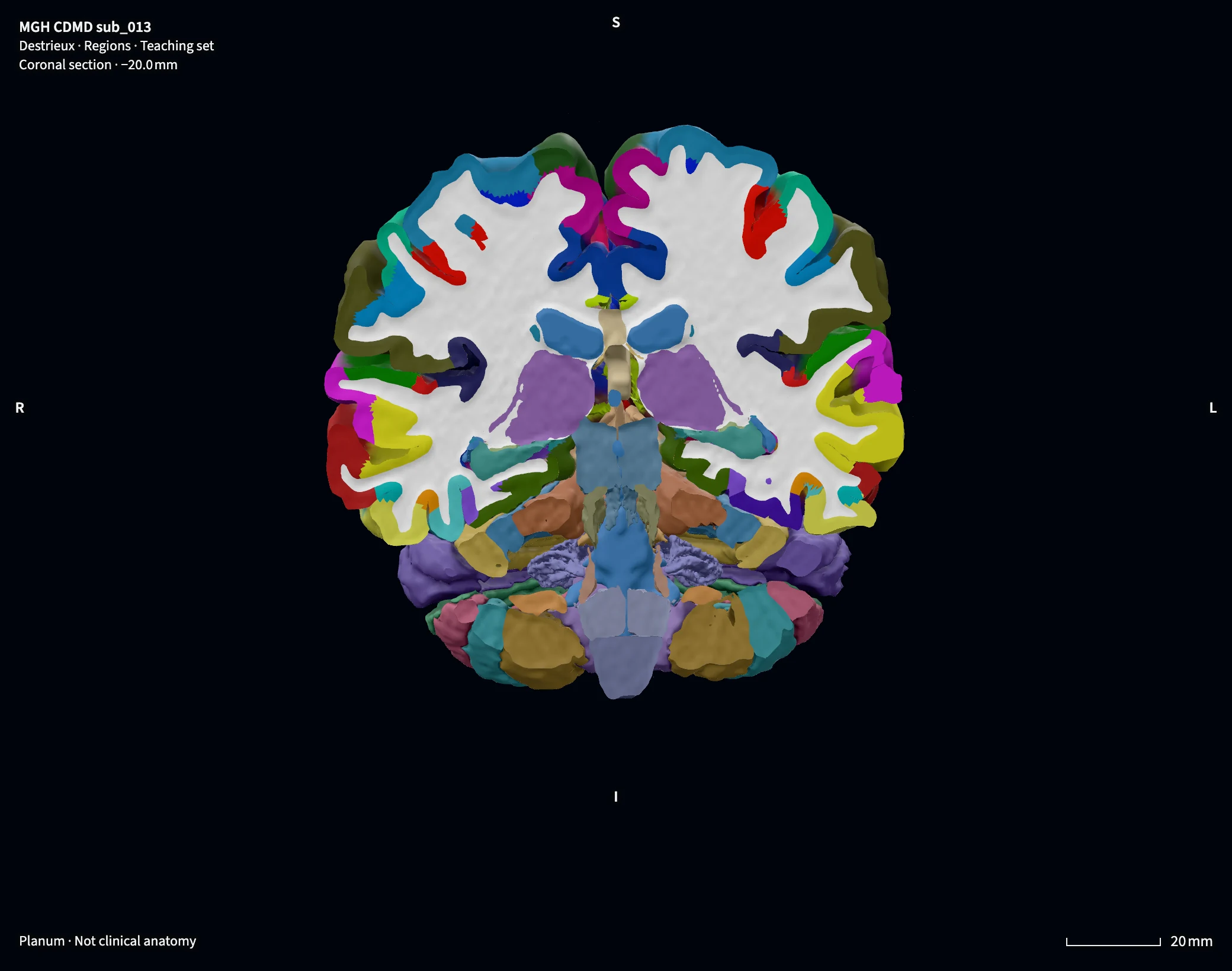
Fig. 8 | The PNG that Save image writes, unretouched. The viewer was opened at #anatomy=cdmd&cut=coronal&pos=-20 in a 1,400 × 900 px window at a device pixel ratio of 1; its 1,040 × 820 CSS-pixel stage was saved at 2 pixels per CSS pixel, 2,080 × 1,640 px. The caption gives the subject; atlas, colouring and internal-anatomy level; plane and signed offset. The orientation letters, the 20 mm scale bar (exact at the camera target’s depth) and the statement are drawn over the rendered frame. The section is seen from the front (right hemisphere on the image’s left). The file was named planum-destrieux-anterior-coronal.png. Once the scene settled the address bar read #anatomy=cdmd&atlas=destrieux&detail=learning&view=anterior&cut=coronal&pos=-20&lang=en: the link, which named no view, faced its cut, and the writer added the atlas, level, the view now held and the language.#
Data#
The viewer’s own state; the ids a link may name are those the loaded anatomy publishes (anatomies.json, the anatomy’s manifest.json, the function, deficit, circuit and tract catalogues).
Method#
Link encoding#
The state travels in the URL hash as URLSearchParams (url-state.ts). encodeState omits every field still at its default (DEFAULTS) and un-escapes %3A and %2C, so ids and coordinates stay readable. decodeState reads each parameter with its own typed reader; a parameter that is repeated or does not parse is left out and named in rejected, and the fields beside it still decode. A written link always names its subject (anatomy), its cortical atlas and its language.
Parameter |
State |
Format and range |
|---|---|---|
|
Subject |
Published anatomy id; absent, the published default. Region ids are shared between brains, so the subject travels with them |
|
Cortical atlas, internal-anatomy system and level (which, with |
Ids |
|
Selected and isolated region |
Region id |
|
Hidden regions |
Comma-separated ids, sorted; a repeated id is read once |
|
Focus |
|
|
Named view |
|
|
Exact camera |
|
|
Plane |
|
|
Offset along the plane normal |
mm, written to 0.1 mm rounded toward zero ( |
|
Reversed side, tilt, azimuth |
|
|
Hemisphere |
|
|
Cortex, internal anatomy, spinal cord shown; exploded view; names on the brain |
|
|
Cortex opacity |
0 to 1, written to 0.01 |
|
Surface colour |
|
|
The reader’s highlights |
|
|
MRI window |
|
|
Panel tab |
|
|
Open function or deficit |
Id; written only from its own tab |
|
The open function’s Paint areas from z ≥ |
Above the published 3 to 100, in half steps; written only with |
|
Guided circuit, step, whole route on screen |
Id; step counted from 1; |
|
Visual field map and its dot |
Id; |
|
Bundles ticked on the Tracts tab |
Comma-separated ids, empty for none; omitted while they are the initial set |
|
Keep tracts on other tabs |
|
|
Language |
|
|
Placed lesion sphere |
|
|
Lesion colouring, drawn tract |
|
|
Published coordinate and its template |
The three numbers as entered, unrounded, each within ±512; space id |
|
One or two distinct cohort ids, e.g. |
|
|
The page is a frame in a course page (Embedding) |
|
Link writing#
createLinkWriter writes 250 ms after a view change and once the camera settles (the engine’s cameraSettled, itself 250 ms after a reader’s move ends). linkState adds to the session view the plane (mode; the crosshair’s offset \(\mathbf{c}\cdot\mathbf{n}\) along the plane normal \(\mathbf{n}\); reverse, tilt, azimuth), the exact camera (orbitLink, null while a named view is held or the tract reference is shown), the MRI window and the lesion and stroke-case stores. A coordinate’s sphere is written as the coordinate, never as a lesion. A function (with its zmin), deficit or circuit is written only from its own tab, stroke cases only with a selected region, bundles only from the Tracts tab or while Keep tracts on other tabs draws them elsewhere, and highlights not while a masthead colour has lifted them. The cortex opacity and colour that drawn streamlines, stroke cases, a painted structure or a whole route impose are written as the reader’s own, so the link restores the reader’s display. The write is history.replaceState, not a push.
Switching subject rewrites the hash and reloads the page: atlas, cut, view, panel and language are kept; selection, isolation, hidden regions, the exact camera and the MRI window are dropped, since they belong to the previous brain’s parcels and intensities.
Link restore#
At start-up decodeState reads the hash; a subject the site does not publish is added to rejected and the default opens. restore then:
Takes a command token (
commands.begin) and holds the writer, so the address bar keeps the link until the scene settles. A later command overtakes the restore, which then stops.Checks each id against the loaded anatomy (
checkLink): atlas, detail, view, colour, tab, selected, isolated and every hidden region, function, deficit, circuit and step, map, bundles and every highlighted region. An unknown id is dropped and its parameter added torejected; one unknown highlighted region drops the wholemark.Applies cross-field rules:
routeneedscircuit;mapis refused beside acircuit, anddotneedsmap;cordneeds a published spinal cord;coordandspaceneed each other and a published space, and a link with both a coordinate and a lesion drops all three;focusandcasesneedregion;tractsneedstab=diffusionorkeeptracts=1;lesionmodeneedslesion, andlesiontracta bundle that lesion reaches.Applies the scene field by field (
applyReaderState); a failed step adds its fields to the not-applied list and the rest still applies. A link with a cut but no view faces its cut.Restores the tab, lesson or map, function or deficit, then the lesion, or the coordinate mapped again through its template’s field (keeping the link’s own cut and camera), then the stroke cases.
linkNotice names what was not applied in the reader’s language (“Not applied from this link: section position and language.”), each parameter by its name in the link.fields table. Editing the hash on the same subject applies the new link as scene commands (onHashChange); another subject reloads the page.
Image capture#
saveSnapshot runs in order:
Plan (
snapshotPlan). The crop is the visible stage’s rectangle. The caption has one line per group of facts: the subject; the atlas, the colouring and the internal-anatomy level (the last only when the masthead offers more than one); then the section (plane and signed offset in mm, with tilt and azimuth for an oblique plane) or, while the camera holds one, the named view; then, with a selection, “Selected: “ and the region named with its side; then, with an overlay, its title and scale; then, with highlights on the stage, Your highlights, “the reader’s own marks, not data” and the regions the key names. A tract reference shown alone replaces the first two lines with its label and drops the overlay and highlights.snapshotMarkingsmeasures the orientation letters, the stage’s labels with their dots and leaders (route landmarks and names on the brain), the visual-field map’s area names, the scale bar and each colour key where the stage draws them, in CSS pixels; a key folded on screen is folded in the image.Fonts.
snapshotFontsloads the faces and words the marks will draw.Capture (
captureSnapshot). The settled pipeline is redrawn at the size chosen in Save image’s menu, 2 or 3 image pixels per CSS pixel whatever the screen’s ratio (without a size, \(\max(\text{screen ratio}, 2)\),SNAPSHOT_PIXEL_RATIO= 2), read in the same task as the render, then returned to the screen’s ratio. A frame wider or taller than the device’sMAX_RENDERBUFFER_SIZEorMAX_TEXTURE_SIZE, or one the browser would draw smaller than asked, is refused before anything is read, with the codesnapshot-too-largeand a message naming the size and the limit; the screen keeps its ratio. The screen ratio is capped for interaction at 1 on phones, 1.5 on coarse-pointer (touch) devices and on integrated graphics processors other than Apple silicon, and 2 otherwise, never above the device’s. The selection outline’sdownSampleRatiois multiplied by the same factor, so the outline keeps its width relative to the anatomy.Annotate (
annotateSnapshot). Marks are drawn over the captured pixels, which are not resampled or filtered. Layout follows the stage (SNAPSHOT_LAYOUT: gutter 16 px, line 16 px, letter gap 12 px, scale gap 8 px), in CSS pixels scaled by the frame’s ratio. The caption keeps left of the top orientation letter; its facts are joined by “ · “, a narrow image breaks lines between facts, and a fact that still does not fit is ellipsised. The statement and the scale bar share the bottom line when both fit between the gutters; otherwise the scale bar moves one line up. Labels under the image’s own marks are placed again around their dots.Save. The canvas is encoded as a PNG and downloaded as
planum-<atlas>[-<view>][-<plane>].pngthrough an object URL revoked after 40 s. A second request while one is being made joins it. A failure raises thesnapshotnotice; a refused size raisessnapshotSize, which says the image would be larger than this device can draw and to choose a smaller size or window. Copy image puts the 2× PNG on the clipboard instead: the clipboard is asked inside the press with the image still being drawn (aClipboardItemholding a promise), since Safari refuses a write begun once the press is over. It is offered only where the browser hasClipboardItem.
Embedding in a course page#
A link with embed=1 opens a page laid out for an <iframe>: the stage alone, at any width, and one line under it naming the subject (and a region the reader picked), the statement “Not clinical anatomy”, Full screen where the frame allows it, and Open in Planum, the same view without embed in a new tab. There is no masthead, panel, status bar or guided tour; the panels’ ports do nothing, so a pick or a link restore cannot fail for want of them. The reader can turn and zoom, read a name by hover or by a tap (the line names the picked region), and move a section the link opened, on the dock’s plate without its tools. A colour key the link carries (paint, highlights) stays on the stage; the highlight strip, which lives in the panel, does not.
Nothing of the anatomy loads uninvited. The head prefetch script returns at once for embed=1, and the start reads only anatomies.json (214 bytes, to name the subject) before it waits for Load the 3D brain (about 20 MB) over the site’s still picture, public/preview.png (its sharing image, 1,200 × 630 px, 511 kB). A cut the link did not open is not prefetched. While embedded, every link the page writes ends in embed=1, so a frame the course page reloads stays one.
The size on the button is what the opening view transfers, measured on 2026-11-16: the manifest, the eleven data files it names, the Destrieux cortex and the teaching set, as planumatlas.com served them gzip-compressed (the Content-Length of each response), 21,382,421 bytes, which the page writes as 20 MB (it counts \(2^{20}\) bytes to the MB, as its download progress does). The same files are 32.2 MB decompressed as served (the model layers meshopt-compressed) and 39.2 MB in public/models/. A link naming another atlas or internal anatomy transfers about 12 MB (Desikan-Killiany with aseg) to 30 MB (HCP-MMP with NextBrain); the button names the opening view’s size whatever the link, since the manifest that says which files a link needs is part of what it would download.
Share in the masthead offers Copy embed code: one <iframe> of the view on screen with embed=1, loading="lazy", allow="fullscreen", width="800" height="600", style="border: 0; max-width: 100%" and a title naming the view (“Planum · subject · atlas · section or held view”). Clickjacking protection would need a frame-ancestors policy, which only a response header can set, and the site’s policy is a meta tag; embedding is allowed.
Scale bar#
With vertical field of view \(\theta\), camera distance \(d\) to its target and viewport height \(h\) in pixels, one pixel spans
at the target’s depth. The bar is the largest length in {0.1, 0.2, 0.5, 1, 2, 5, 10, 20, 50, 100, 200, 500, 1,000} mm whose length \(L/s\) lies within 60 to 150 px. A viewport or distance of zero (a hidden tab) gives no bar.
Display#
The link is the page URL; copying it (Share › Copy link to this view) shares the scene, and Copy embed code gives the frame for a course page. Save image is in the masthead, a menu of Save at 2×, Save at 3× and Copy image; the statement “Planum · Not clinical anatomy” (“Planum · Pas une anatomie clinique” in French) is drawn on every image, and a notice names the saved file. The Back button does not step through camera moves, since the link is replaced in place. The PNG is the visible stage only, not the side panel; Linked MRI saves its own planes. The Provenance sheet’s References for this view lists the works behind the view on screen, to Copy as text, Download .bib or Download .ris (acknowledgements).
Validation#
Test |
Criterion |
Result |
|---|---|---|
|
Round trip of every non-default field and a fixed link corpus; defaults omitted; repeated, unparsable and out-of-range fields named and left out; cut offset rounded toward zero; up vector only when it differs |
passes |
|
A decoded camera within an orbit limit up to |
accepted at 0.17 mm, refused at 0.18 mm |
|
Unknown ids and each cross-field rule above |
passes |
|
Write after stillness, held during a restore; subject and language always written; subject switch reloads; coordinate written as entered, never as a lesion; failed fields named in link order |
passes |
|
Scene applied field by field; a failed layer, region, system or camera reported under its own field; a restore overtaken by a later command stops |
passes |
|
Caption facts and packing, ellipsis, bottom-line placement; file name; one file for two requests; URL revoked at 40 s; only marks added to the frame |
passes |
|
Captured canvas sized to its crop at ≥ 2 pixels per CSS pixel; screen canvas unchanged |
passes |
|
A 3× frame of a 400 × 300 stage is 1,200 × 900 px with the brain drawn, its caption 2.85–3.15 times as tall and wide as at 1×; a frame past the limit read as 1,024 px is refused with its size and the limit, and the stage keeps its ratio |
added 2026-11-16 |
|
An embedded link fetches no |
added 2026-11-16 |
|
Frustum geometry; 1-2-5 lengths; bar within 60–150 px at every usable distance; no bar for a zero viewport |
passes |
Limitations#
A link names ids of one published build; a renamed or dropped region, atlas or layer is refused and named.
The camera travels to 0.1 mm; a link written at an orbit limit reads back up to 0.17 mm beyond it.
A link carries state, not data: a reader’s overlay, a dissection’s undo history and a lesion’s measurements are not in it; the lesion is measured again and a coordinate mapped again on restore.
The scale bar is exact only at the depth of the camera’s target.
The download size an embedded frame names is the opening view’s; a link naming a larger atlas or NextBrain transfers up to about 30 MB, and the figure was measured once and is not recomputed by the build.
An embedded frame shows no panel: what a link would open there (a function’s profile, a lesion’s report, the Tracts tab’s bundles) is not shown, and a notice is spoken but not drawn. The still picture is the site’s sharing image, not the linked view.
A size the device cannot render is refused rather than tiled; 3× of a large stage can pass a small mobile GPU’s limit.
The PNG is not clinical anatomy and states so.
Code availability#
Code |
|
Configuration |
None; |
Tests |
|
npm test --prefix web -- src/lib/core/state src/lib/controller/links.test.ts src/features/snapshot src/lib/engine/render/scale-bar.test.ts src/lib/engine/contract.test.ts src/lib/core/embed.test.ts src/boot/prefetch.test.ts
npm run test:browser --prefix web -- src/features/snapshot src/lib/engine/index.svelte.test.ts src/app/embed.svelte.test.ts
Figure state: https://planumatlas.com/#anatomy=cdmd&cut=coronal&pos=-20, then Save image › Save at 2×.